
// 31/10/2026 // by Elder0010
Commodore 64 Halloween demo by The Pumpkins, the follow-up to All Hallows’ Eve.
Reached #03 at the 2026 edition of the ZOO Party demo competition.
The Pumpkins are Atlantis, Bonzai, Elysium, Genesis Project, Lethargy, Offence and Pretzel Logic:
Like its predecessor, the demo is made of parts delivered by different people, living together inside a shared framework. I wrote four of the parts: The Torch, The Witch Pot, The Funscroller and The Fortune Teller. Besides the demo, the third disk also holds a game: The Pumpkids.
Breadbin of Horror was made in two months, from August 27th 2026 to Halloween of the same year. The team worked remotely and coordinated on Discord, and Trap of Bonzai directed the project.
Making a demo this big in two months is not an easy challenge, but for a team of people with decades of experience on the platform it was doable, with daily work and a lot of laughs together.
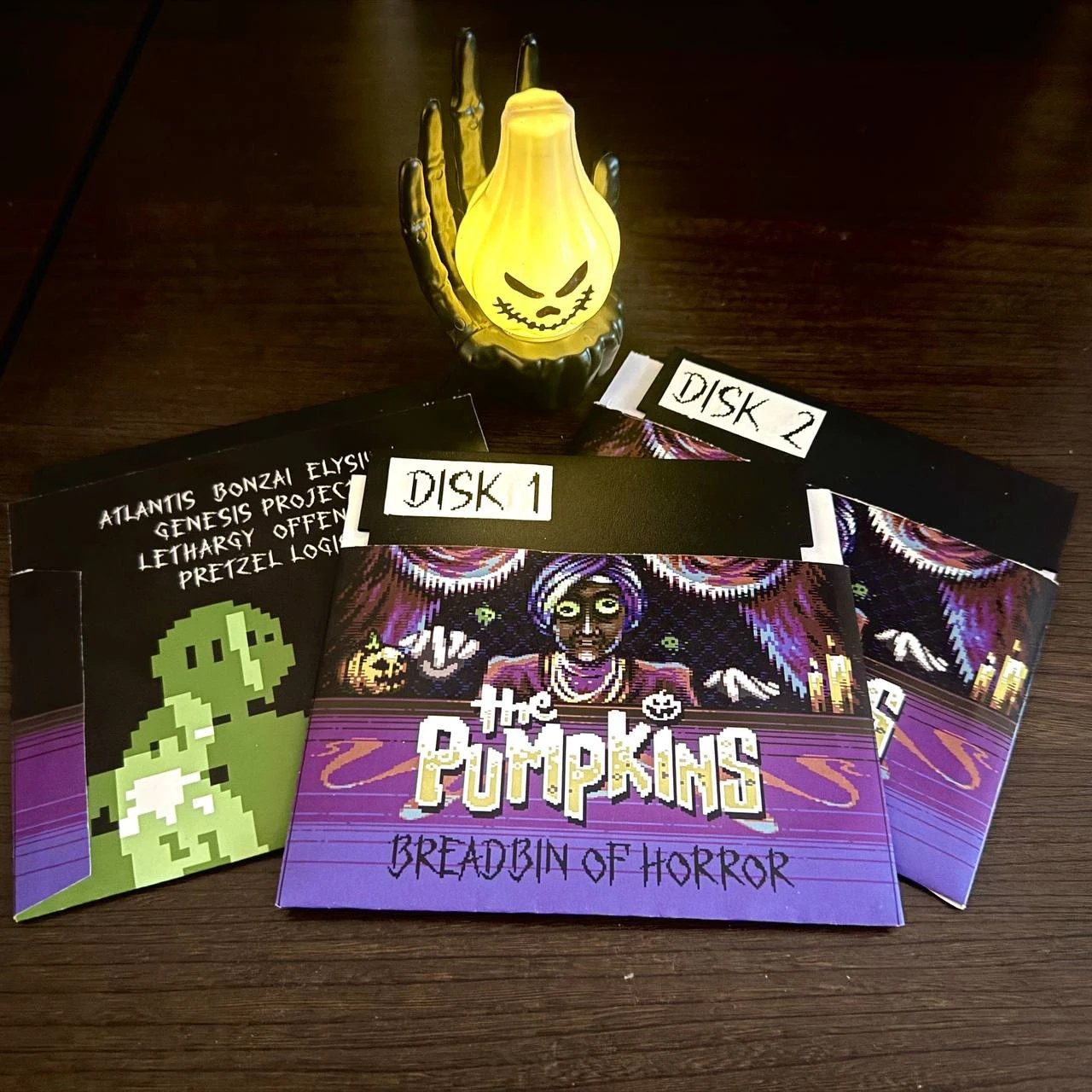
The parts run inside the demo framework made by Bonzai, built around Spindle, the loader by LFT. The framework loads each part while the previous one is still running, plays the music and hands the machine from one part to the next.
A part has to play by its rules: the music keeps running all the time, some of the memory belongs to the framework and to the tune, and when the part is done it simply returns.
Disk space is always short, so in all four parts the biggest tables and the speedcodes are built when the part starts, instead of being loaded from the disk.
A torch flame wanders around the room and lights the walls, revealing skulls carved into the stone, while embers fly away from it and the edges of the artwork glow when the flame passes by. I wanted to create a sort of “cursed” atmosphere, where the light both reveals and conceals the macabre details of the environment. I am very happy with how it turned out: the music from SMC complements the eerie ambiance perfectly, and the dithering on the walls perfectly matched the light reflection of the flame.
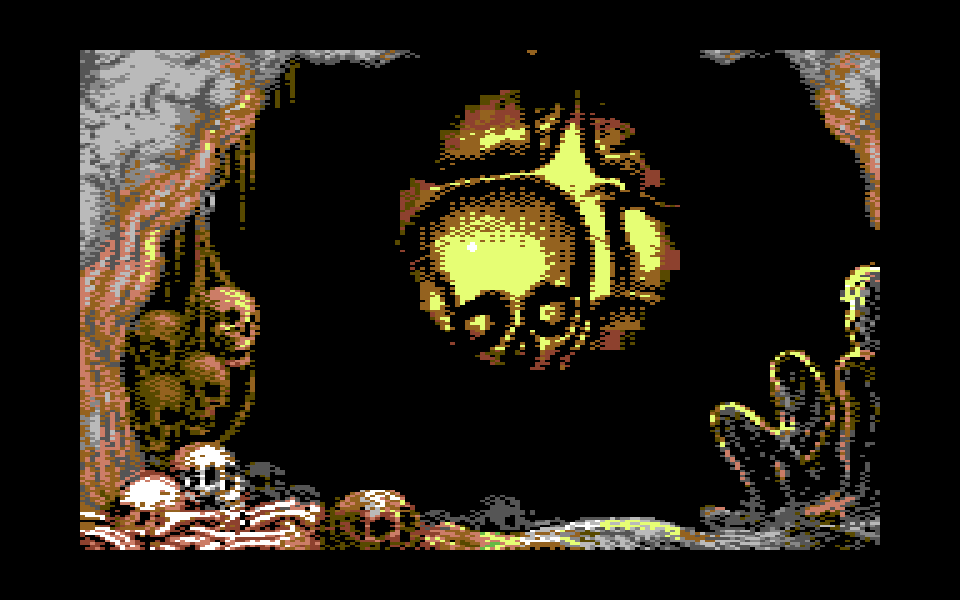
The wall starts as a normal map: for every pixel, the direction its surface is facing. Lit from the front and split into 4 brightness bands with a 4x4 Bayer dither, it becomes a bitmap where each multicolour pixel stores a band, from %00 (the darkest) to %11 (the brightest), instead of a colour. The colours are chosen at runtime by the light: the same band is black far from the flame and yellow right next to it.
The light is a “cookie”: the shape of the lit area around the flame, bright in the centre and fading towards the edge. For every pixel the engine needs one number: how much light reaches it.
The lit area is an ellipse, and the distance from the centre of an ellipse can be split into a horizontal part and a vertical part. Both parts are precomputed in two small tables, fx with one value per pixel column and fy with one value per line, and the light of a pixel is just the intensity of the flame minus the two of them:
light = intensity - fx[column] - fy[line]Lighting a pixel takes no multiplication and no square root: two table reads and two subtractions. Everything else comes from the same subtraction:
The same subtraction works for whole 8x8 blocks. Subtracting the smallest values of fx and fy over a block gives its brightest corner, subtracting the largest gives its darkest one. If even the brightest corner is dark, the whole block is cleared without looking at its pixels. If both corners have the same light level, the block only needs the palette of that level. Only the blocks crossed by the boundary between two levels are worked out byte by byte.
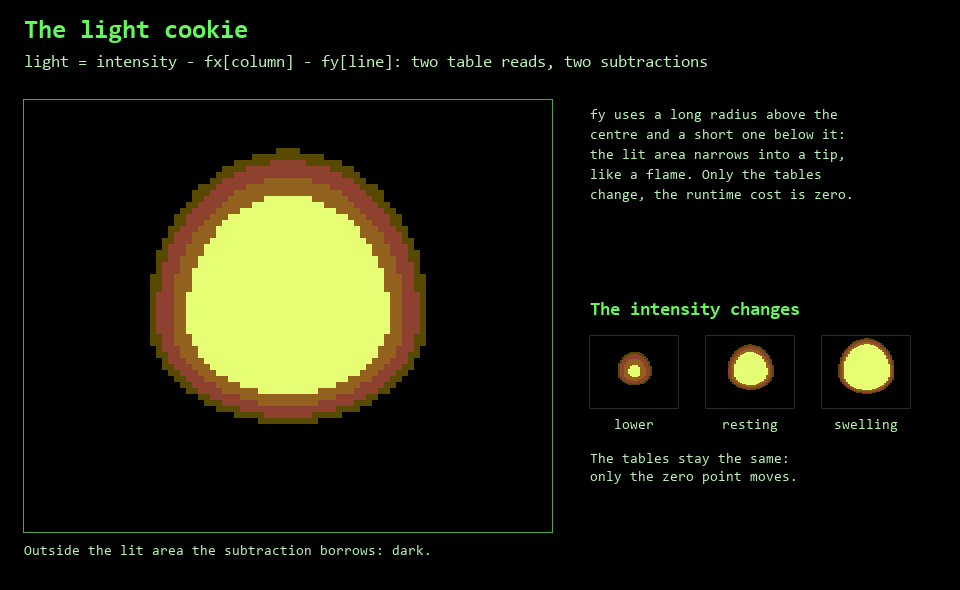
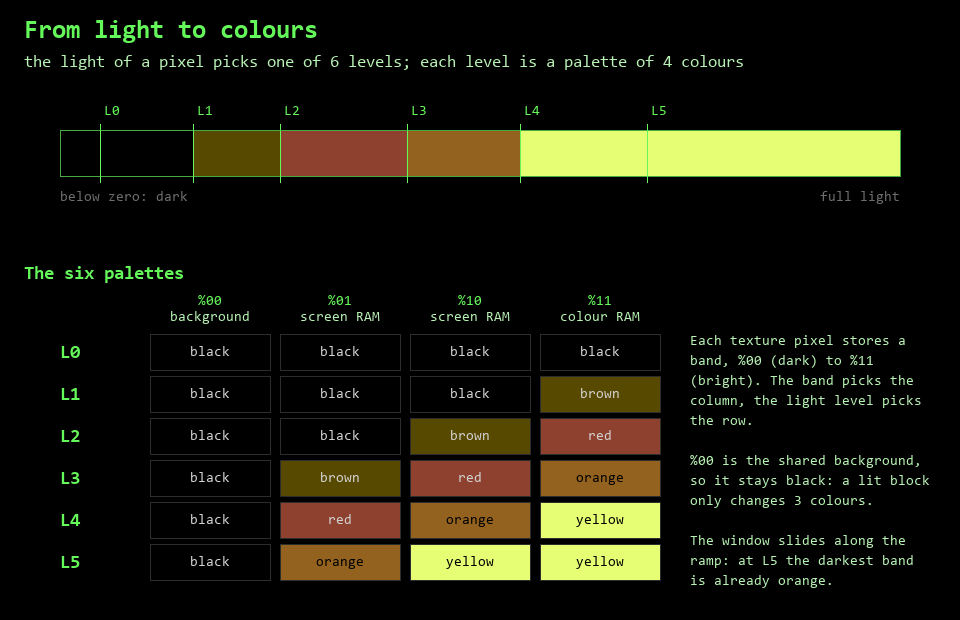
The light is quantized into 6 levels, and each level is a palette of 4 colours taken from a fire ramp (black, brown, red, orange, yellow). The band of a pixel picks the colour inside the palette. The darkest band, %00, is the background colour and stays black; the other three come from screen RAM and colour RAM, so every 8x8 block can have its own palette. A block takes the palette of its brightest pixel, and each pixel inside it is remapped to the closest colour available in that palette, according to its own light level and its band.
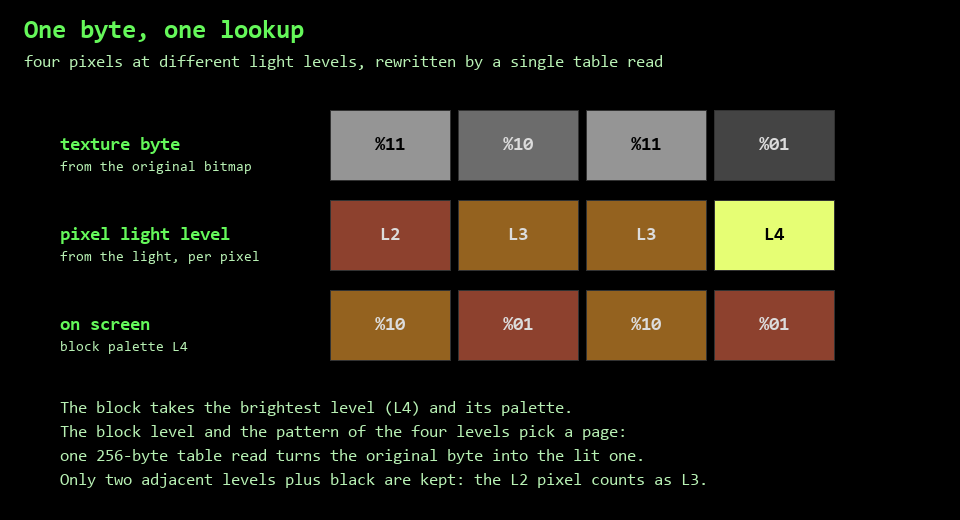
Doing this per pixel would be hopeless, so the remapping is precomputed into “transformation pages”: 256-byte tables mapping an original bitmap byte to its lit version. A byte holds 4 pixels, and the page is chosen from the light level of the block and the pattern of the 4 light levels along the byte. Inside a block only two adjacent levels are kept, plus black (a lit pixel even darker than that is counted as the darker of the two), which keeps the number of pages small. Rewriting a bitmap byte then costs a single table read:
lax pristine,y      // original byte, into A and X
lda page,x          // its lit version
sta bitmap,y
The hot loop is copied into zero page at init.
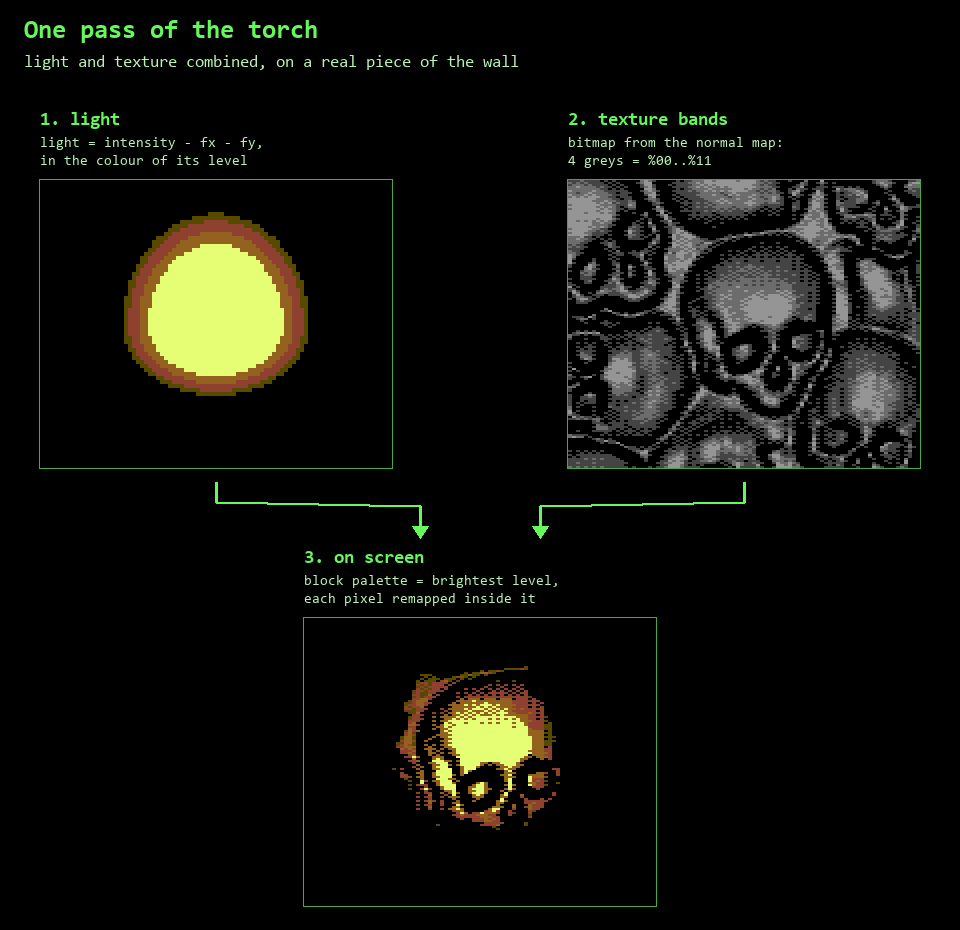
Here is the whole chain on a real piece of the wall, simulated with the tables and remap rules of the effect:
The movement of the torch is driven by a small rule language (HOLD, MOVE, GROW, SHRINK, OFF) with durations in real frames, starting at a fixed raster phase: every run is reproducible to the frame, so if a glitch shows up at a given moment I could tweak exactly that rule and try again. The orbit is an asymmetric shape on x and a triangular wave on y.
The flame keeps moving even when the torch stands still. The position of the light is kept in quarters of a block, and the dance adds 0 or 1 quarter on each axis: the whole cookie sways by one small step left and right, up and down. The sway comes from two tables made of slow sine waves, read in step with the flicker, so the swaying and the breathing of the flame go together without repeating in the same way. The embers start from the swayed position, so they leave from where the flame actually is.
The dance values don’t go straight into the engine. A small routine at the end of each pass copies them into two latches, which the next pass reads. When the storyboard is in a MOVE rule the latches are frozen: with the window moving, a sway flipping between 0 and 1 would make whole columns at the edge of the egg flicker between lit and dark. While the torch walks, the movement itself keeps the flame alive and the flicker stays at full strength; as soon as it stops, the dance comes back.
The embers are 8 sprites flying on precomputed trajectories: 4 different horizontal wobble tables times 2 rising curves, with irregular launch phases, so no two embers fly the same way.
The flame also lights the static artwork around it: the rim of the hand, the skulls and the bones on the floor catch the fire and go from orange to yellow, and to white when the flame gets really close. The artwork is never redrawn for this. Each of these blocks changes colour with a single byte written to colour RAM.
That works because in these 95 blocks the yellow always sits in the %11 bit pair, the one that reads colour RAM. In a multicolour bitmap a colour can sit in any of the three block colours: the high or low nibble of screen RAM, or colour RAM. Where the yellow of an edge block was in screen RAM, its bit pairs are swapped in the 8 bitmap bytes (%01 with %11, or %10 with %11) and the two colours are swapped to match: the picture stays identical, but now the yellow lives in colour RAM. At rest that byte is set to orange.
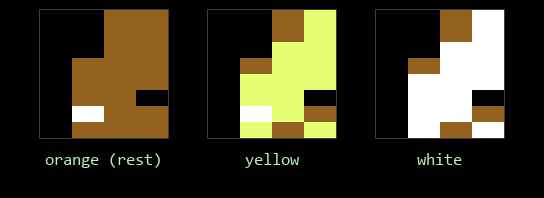
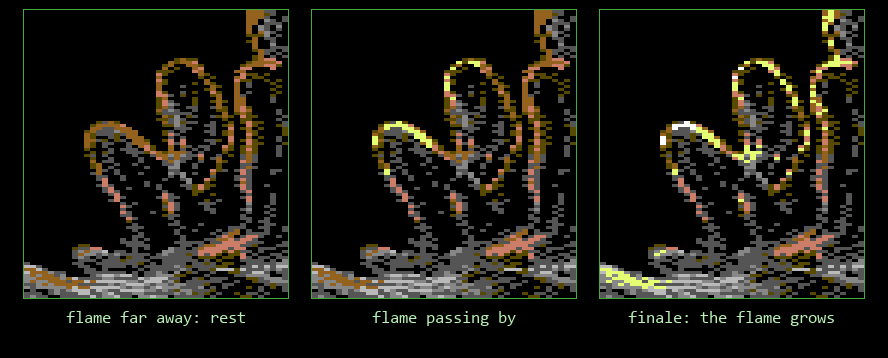
The same edge block with three different values in its colour RAM byte: orange at rest, yellow, white. The other pixels of the block don’t change.
At runtime a short routine updates 16 of these blocks per pass, in rotation, so all 95 are refreshed every 6 passes. For each block it computes an index:
index  = |dx| + |dy|      distance from the flame, in blocks (dy halved above it)
       + breath           0..4
       + ripple           0..2
       + fade             0..15
       - grow             0..8
colour = glowmap[index] index clamped to 0..31The table has 32 entries and only three colours:

The closest the real orbit gets to the artwork is a distance of 7, so white only appears for an instant, when the flare peaks with the flame nearby or during the GROW.
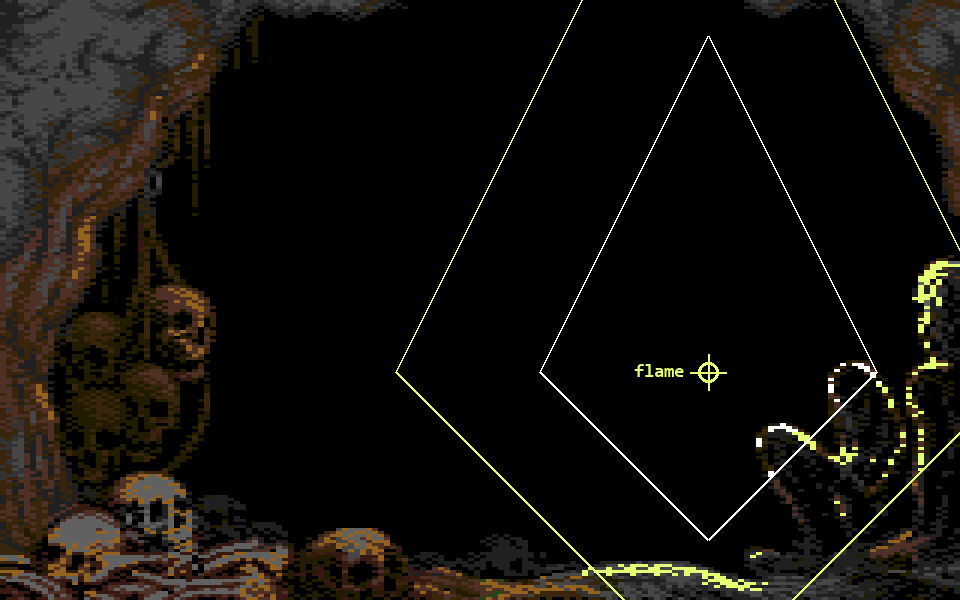
Here is the formula applied to the whole screen, with the artwork dimmed and the 95 edge blocks at full colour. The white and yellow lines mark where the index crosses 9 and 15, and they reach twice as far upwards as downwards. The flame is placed by hand, closer than the real orbit ever gets, to show all three colours at once.
And the same corner of the screen in three real frames: at rest, with the flame passing by, and in the finale.
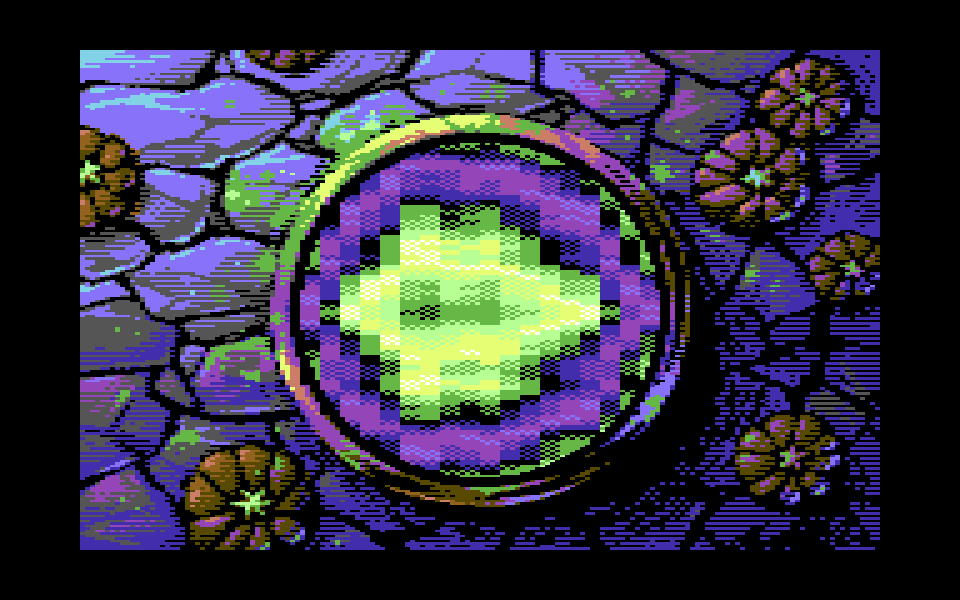
A witch’s cauldron seen from above, with a bubbling potion rendered as an FLI plasma, surrounded by stones and pumpkins. The colourful details of the background have been carefully crafted by Mikael, adding depth and vibrancy to the scene. The “witch theme” of the demo is continued here, paired to the previous one in the demo (a flying witch over a plasma moon).
FLI means forcing a badline on every rasterline. On a badline the VIC fetches a new row of screen RAM, and in bitmap mode screen RAM holds two of the four colours of every 8x8 cell. Force it on every line, pointing $d018 at a different screen each time, and every line gets its own colours. Here the 8 screens sit at $4000-$5FFF and line L reads screen (L − 67) & 7; a plasma cell is 2 lines tall, so the plasma speedcode writes each cell into two consecutive screens.
To force a badline you write $d011 with the vertical scroll equal to the low 3 bits of the current rasterline. The whole routine is 175 unrolled blocks, one per line from 68 to 242, generated by a KickAss loop:
irq_fli:                            // raster IRQ at line 64
    BeginIRQ()                      // save A/X/Y, acknowledge the VIC
    StableRasterTimer()             // remove the jitter of the IRQ entry
    CycleDelay(148)                 // walk into the badline of line 67

fli_blk0:
    .for (var L=68; L<=242; L++) {
        ldx #[((L-67)&7)<<4]|$08    // screen for this line, bitmap at $6000
        stx $d018                   // lands at cycle 2
        lda #value                  // one sprite register for the FLI bug sprites
        sta $d0xx                   // (or a 6-cycle filler: lda #0 / bit abs)
        ldx #$38|(L&7)              // bitmap mode, yscroll = this line
        stx $d011                   // lands at cycle 14: badline
    }

fli_exit:
    lda #$3b                        // back to a normal bitmap screen
    sta $d011
    lda #$08
    sta $d018
    ...                             // next IRQ: music at line 245
There is no loop counter and no wait inside the blocks: the VIC does the timing. The $d011 write at cycle 14 turns line L into a badline, the VIC takes the bus from cycle 15 to 54 to fetch the colours, then the DMA of the two sprites over the FLI bug follows. The next block’s first opcode fetch is stalled until all of that is over, so the CPU always resumes at cycle 60:
line L-1   cycle 60-61   ldx #screen
           cycle 62-2    stx $d018          write at cycle 2 of line L
line L     cycle 3-8     lda #v / sta $d0xx (sprite register)
           cycle 9-14    ldx #d011 / stx $d011   write at cycle 14
           cycle 15-54   badline: the VIC owns the bus, CPU stalled
           cycle 55-59   sprite DMA, CPU still stalled
           cycle 60      next block starts
The badline resynchronizes the code at every line, so the 175 blocks never drift. Writing $d011 at cycle 14 is also as late as possible: the VIC doesn’t reset its row counter, so the bitmap keeps advancing one line at a time as in a normal screen, and only the colour fetch is forced. The cost of the late write is the FLI bug on the first 3 columns.
All the blocks are exactly 15 bytes long, filler included. That is what makes the exit of the part cheap: to switch off line L, the closing animation patches the $d011 value at fli_blk0 + 15 × (L − 68) + 11 with an invalid video mode, which the VIC shows as black.
On every forced line the VIC can’t fetch the colours of the first 3 character columns in time (the FLI bug), so those 24 pixels show garbage instead of the art. Here the FLI bug is covered by sprites that redraw the art on top of it.
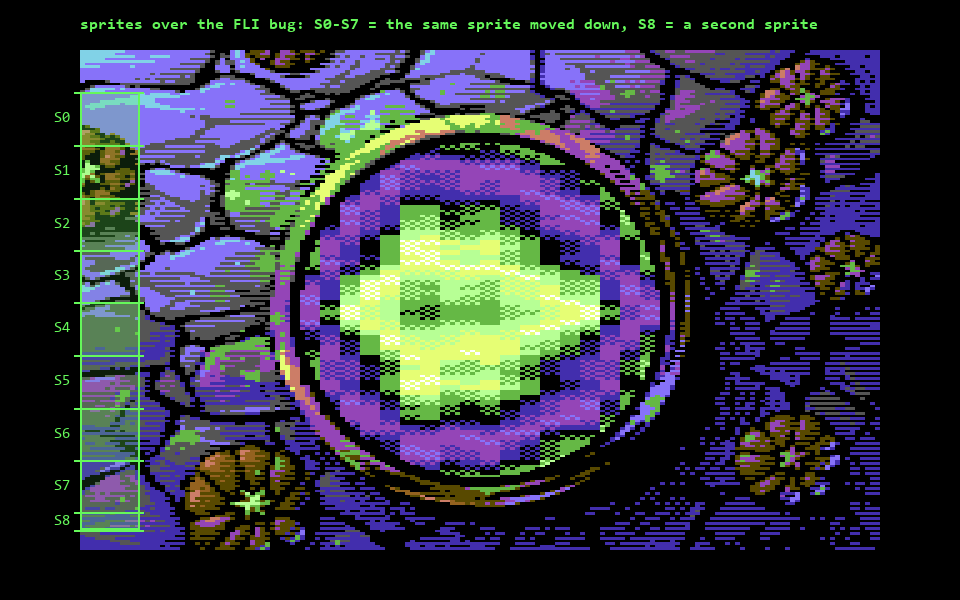
The FLI bug is 24 pixels wide, exactly the width of one sprite. A multicolour sprite sits at the left edge of the screen and is reused 8 times going down, 21 lines each time (S0 to S7 in the picture), and a second sprite covers the last 7 lines (S8). Under the sprites the bitmap is left empty.
Moving the sprite down for each new row takes one write to its Y position, 7 writes per frame. The sprite pointers need no writes at all: every line reads its pointer from its own FLI screen, so each row of the sprite finds the right pointer already in place.
The colours are the hard part. A multicolour sprite line has 3 colours (the sprite colour plus the two shared ones, $d025 and $d026), while the art changes from line to line. Each line block has one free 6-cycle slot, enough for an lda #value / sta $d0xx, so on every line exactly one register can change: one of the shared colours, the sprite colour, or the Y. The register to change on each line is chosen in advance to follow the art, and only 27 of the 2100 pixels under the FLI bug end up approximated.
The potion value of each cell is a separable sum: a bowl shape (r² on both axes) plus a horizontal and a vertical wave buffer, with 4 waves animating both axes. The palette is periodic over 128 entries, and the dithering happens in “value space”: 4 zero page pointers, chosen with a 2x2 Bayer pattern per cell, read the palette at slightly different offsets. Plasma cells are 4 pixels wide and 2 lines tall, 1008 of them inside the pot, and the plasma speedcode (about 11KB) is generated at init. It is byte-identical to the assembled one and saves 29 blocks on the disk.
The intro uses the plasma engine itself. With all the waves at zero, the value of a cell is just the bowl plus a “flow” counter, so lighting a single palette entry draws a ring that expands from the centre. Writing entries into a dynamic palette page pours a blue liquid into the empty pot; then the wave amplitude ramps up through 16 levels, and a “heat front” walks the palette entries one step at a time along a colour chain (black, blue, purple, cyan, green, light green, yellow, white) until it reaches the final palette.
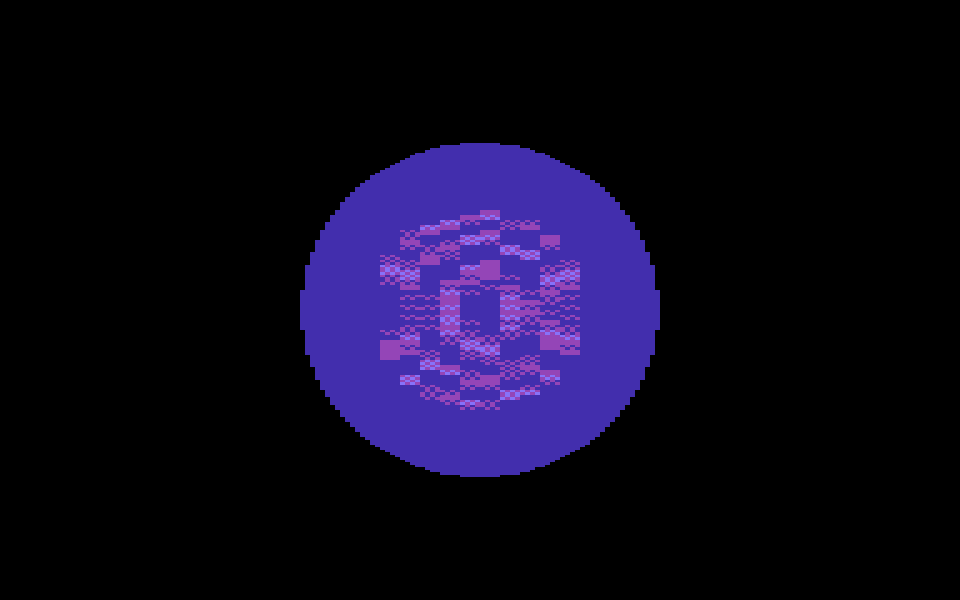
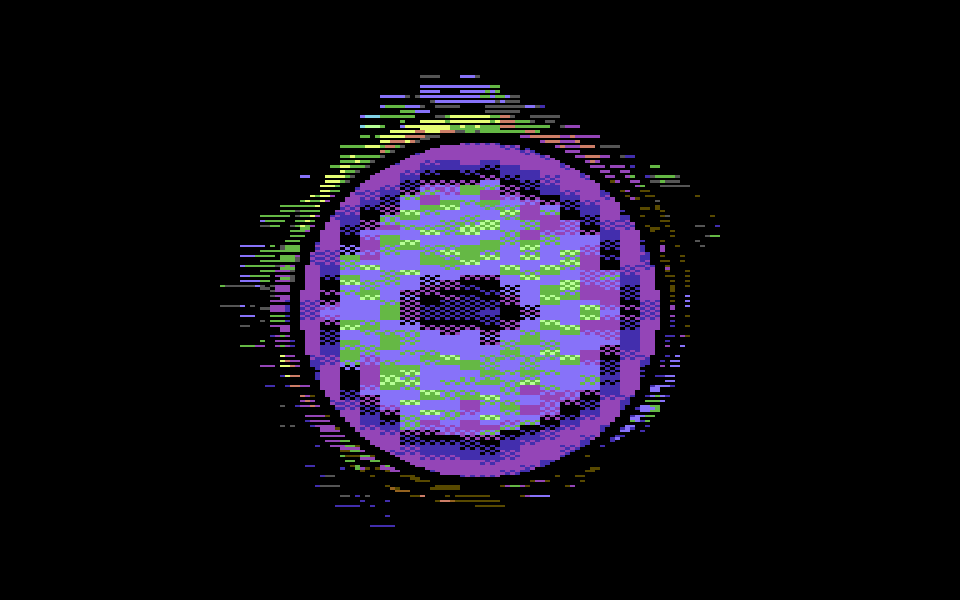
Meanwhile the decorations are revealed by a scanline wave: 8 walkers copy byte j of every cell in wave order, so the image appears line by line instead of block by block. The exit closes the screen with 8 shutters, switching lines off with an invalid video mode (ECM together with bitmap mode gives black) directly in the operands of the FLI code. The part lasts a fixed number of frames, so a longer intro leaves less time for the full plasma.
A giant scroller with a wave running through it, bats flying in front of and behind the letters. It’s an old routine that I originally planned for the previous Pumpkins demo, but I didn’t made it in time for that release.
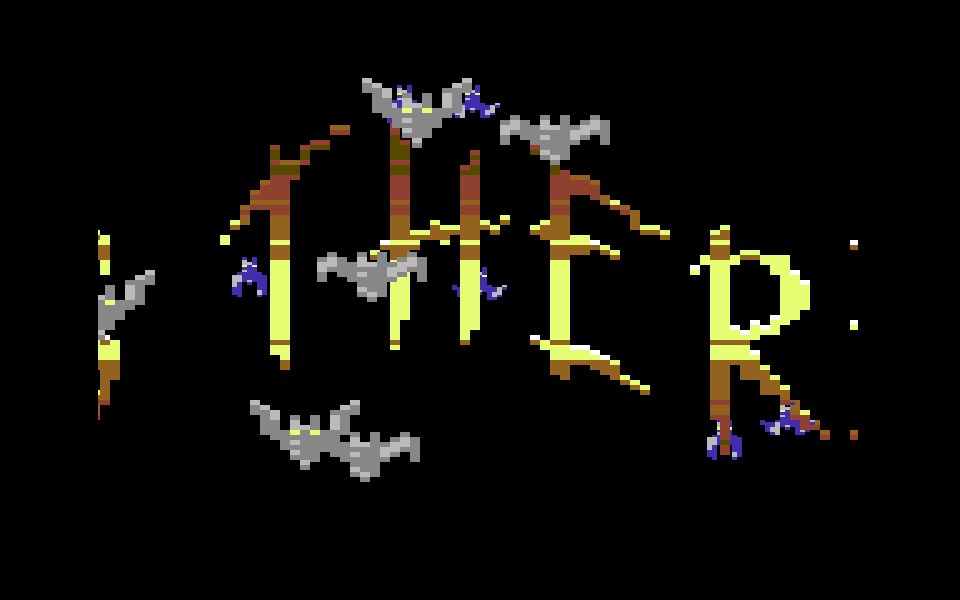
The scroller is drawn in a charset. A character is made of two half
columns (4 pixels each), and there are at most 16 possible half column
patterns. The charset is a 16x16 matrix of all the combinations:
character (L << 4) | R contains pattern L on the left and pattern
R on the right. That means OR-ing two character codes gives the same
result as OR-ing the two bitmaps, and the whole renderer is an unrolled
lda (left),y / ora (right),y / sta screen,x over 19 rows
and 40 columns.
The wave is applied per half column as an offset added to the pointer of each column, so it costs nothing extra.
The font comes from the artist’s sheet, where one pixel of the font becomes a 4x4 pixel cell on screen. That’s 358 distinct columns, packed on disk as nibble strips. Only the columns currently on screen live unpacked in RAM, in a cache of 128 slots: every frame the column entering the screen is unpacked into the next slot, and the renderer indexes the slots directly. Rendering and feeding take around 28k cycles, so the screen is double buffered and flipped every 2 frames exactly: 4 pixels per frame, no stalls.
The two letter colours ($d022 and $d023) change every 2 lines to draw a gradient. The raster chain is computed at assemble time and an IRQ is placed only where the colour actually changes (26 per frame). The colour never changes at the beginning of a badline, where the CPU has no time left and the sprite DMA would push the write to the next line.
The 12 bats are multiplexed on 3 fixed bands, using only sprites 0-3, so that the DMA ends early enough to keep all the gradient writes inside the border. The bats in front are expanded and fast, the ones behind use the sprite priority bit: to make the letters cover them, the multicolour bit pairs of the font are swapped, so the letter body is foreground and only the thin highlight line counts as background.
Everything runs inside interrupts, and the main loop is a single
jmp *: the CPU time left in the main thread is used by the
framework to preload the next part while the scroller is running.
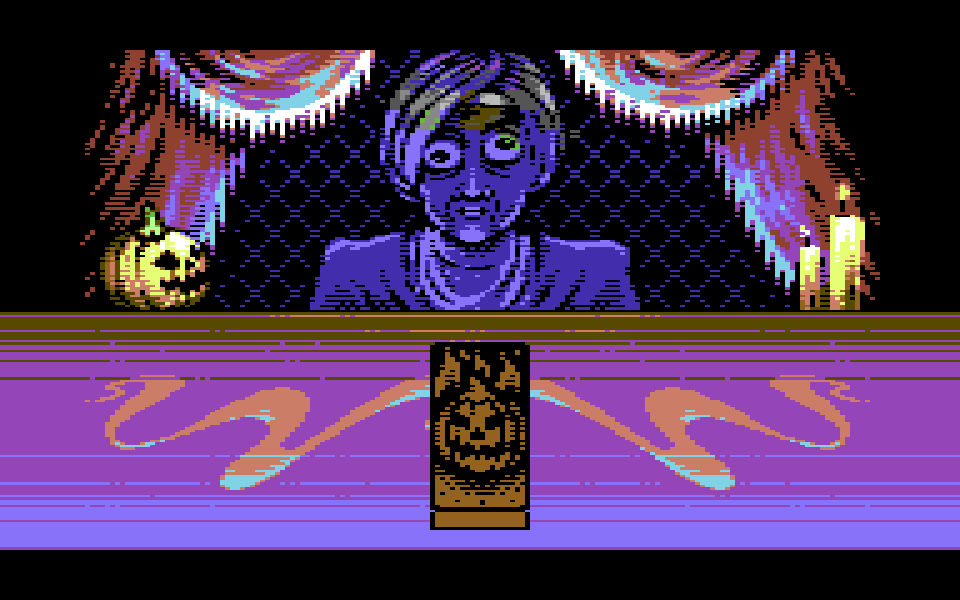
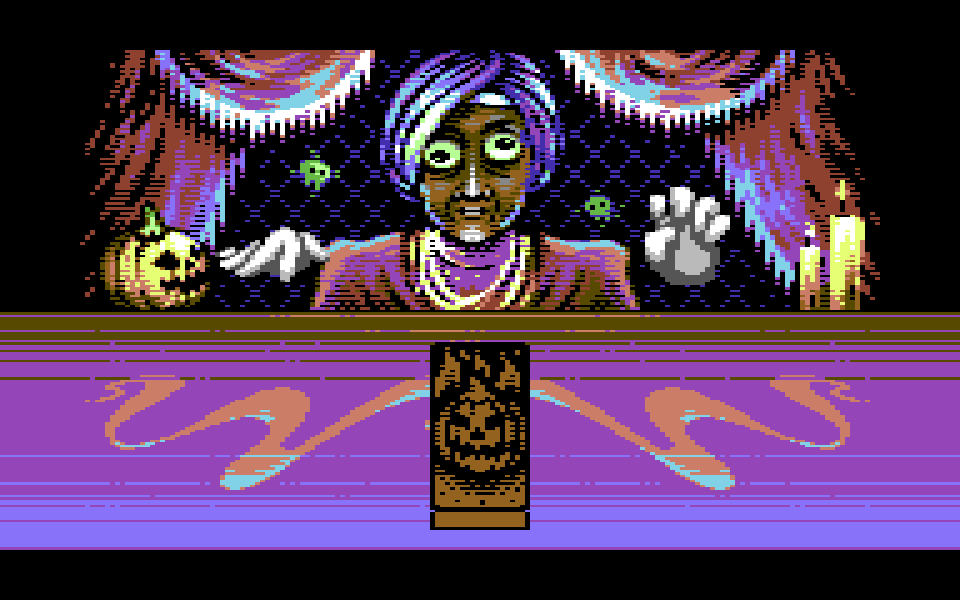
In my opinion this one catches perfectly the Pumpkins spirit. It’s funny with a touch of surreal humour. The artwork from Mikael is fantastic, and the music from Metal here is perfectly fitting the mood. A fortune teller appears on an empty stage, shuffles a tarot deck, cuts it into three piles and turns three cards: THE AMIGA* (boooooooo!!!), THE PERFORMERS and THE ALCOHOL-FREE BEER. A speech bubble delivers the prophecy, then she vanishes in a puff of smoke. This is by far the most complex part I have written for this demo. The scene is compressed with DALI, and a loader part shows the deck being built card by card while Spindle loads it and the 6502 decrunches it in place.
*I have a theory: a scener’s skill level is inversely proportional to the number of times he screams AMIGAAAAAAAA during a demo at a party.
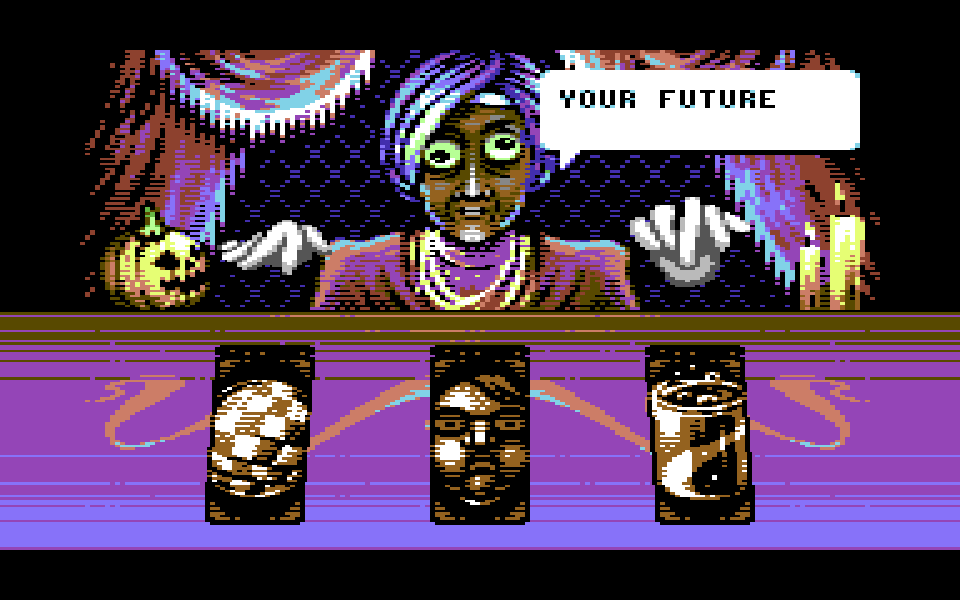
The whole screen is a multicolour bitmap, badlines included. The three cards on the table are drawn with 6 multicolour sprites, two side by side for each card. In the rest of this section I call each pair of sprites a box: 48 pixels wide, one per card.
Sprites are only 21 lines tall, so the table is split into horizontal bands of 21 lines, up to 5, and the same sprites are reused in every band, one below the other. Each band has its own screen holding the sprite data for that band, so moving to the next band takes a single write to $d018.
Inside a box the sprite memory works as a line buffer: every frame the renderer decides which row of which card appears on each rasterline, and copies only the lines that changed. It works in three steps.
The card data. Each card is stored column by column: 6 columns (3 bytes for the left sprite, 3 for the right one) of 219 bytes, one byte per card row. Rows 0-71 are the back, 72-143 the face, 144-215 the back as it looks on the pile, then a blank row and two rows for the edges of the deck. One line of a card on screen is a row index r, and its 6 bytes are at column + r.
The map. MAPBUF is a list of 105 bytes, one for each line of the table (5 bands of 21 lines). For the box being drawn, MAPBUF[l] says which card row appears on line l: a number from 0 to 218, an index into the columns described above. The same buffer is reused for the three boxes, one after the other. This is the map of a box with a card in flight over its pile, squashed to half height:
line     MAPBUF            on screen
0-9      216               blank
10-19    144 ... 153       top of the pile (the back of its top card)
20-55    72, 74 ... 142    the card in flight, face up, half height
56-79    190 ... 213       the rest of the pile, below the card
80-82    217, 217, 218     the edges of the deck
83-104   216               blank
The renderer fills the map like a painter, back to front: blank lines first, then the pile rows the card in flight doesn’t cover, then the edges, and last the card in flight, on top of everything. Every layer is a run of consecutive numbers, except the card in flight. It also writes only the lines that can have changed: the union of the lines the box covered in the previous frame and the ones it covers now. The lines the card has just left become blank, and the copy afterwards runs over the same range only.
A card being turned just gets shorter: at half height it shows every other row of the card, at a third of its height one row out of three, and so on. The loop below goes down the lines of the box and adds a step to the card row at every line: 1 for a full-size card, 2 at half height, with a fractional part for the sizes in between. The step and the last line are written into the code before the loop runs:
loop:   sta MAPBUF,y        // card row for this line
        tax
        lda frac            // fractional part of the row
        adc #step_frac      // (written before the loop)
        sta frac
        txa
        adc #step_int       // next card row (written before the loop)
        iny
        cpy #last_line      // (written before the loop)
        bne loop
That is 26 cycles per line. When the card is full size (a step of exactly 1, as when it lands) a simple counter does the job in 14.
The copy. A speedcode with one 42-byte block per table line compares the map with what is already in the sprites and copies only the lines that differ. The 105 blocks are generated at init from a template, since they only differ in their addresses:
.macro SCLine(l) {
    .var base = BANDSCR + floor(l/21)*$400 + 3*mod(l,21)
        lda MAPBUF + l      // card row wanted on line l
        cmp CUR + l,x       // card row already in the sprite
        beq skip            // same row: 11 cycles and done
        sta CUR + l,x
        tay
        lda (ZP_COL+0),y    // left sprite, 3 bytes
        sta base + 0,x
        lda (ZP_COL+2),y
        sta base + 1,x
        lda (ZP_COL+4),y
        sta base + 2,x
        lda (ZP_COL+6),y    // right sprite, 3 bytes, 3 blocks later
        sta base + 192,x
        lda (ZP_COL+8),y
        sta base + 193,x
        lda (ZP_COL+10),y
        sta base + 194,x
skip:
}
base is the line inside the sprite block of its band: 3 bytes per line, a new band (a new screen, $400 further) every 21 lines. The same code serves all three boxes: in every band the blocks are stored left sprites first (box 0, 1, 2) and then right sprites, 64 bytes each, so X = box × 64 selects the box, and the 6 zero page pointers ZP_COL point to the columns of that box’s card. CUR keeps, per box and per line, the row currently in the sprite.
The renderer never runs the whole speedcode. It writes an RTS at the start of the block after the last line of the range, jumps into the block of the first line, and puts the original byte back when it returns:
        ldy ZP_RNG+1        // last line of the range
        iny
        lda sc_lo,y         // address of the block after it
        sta ZP_PAT
        lda sc_hi,y
        sta ZP_PAT+1
        ldy ZP_RNG          // first line of the range
        lda sc_lo,y
        sta scjmp+1         // entry point
        lda sc_hi,y
        sta scjmp+2
        ldy #0
        lda (ZP_PAT),y      // save the opcode...
        sta patsave
        lda #$60            // ...and write an RTS
        sta (ZP_PAT),y
        ...                 // ZP_COL pointers, X = box * 64
        jsr scjmp           // run the speedcode from line lo to line hi
        ldy #0
        lda patsave         // put the opcode back
        sta (ZP_PAT),y
        rts
scjmp:  jmp speedcode       // (operand patched)
A line that didn’t change costs 11 cycles, a copied line about 73. A card standing still costs nothing at all, so the cost of a frame grows only with the lines that actually move, and that is what keeps the shuffle and the flips inside the frame budget.
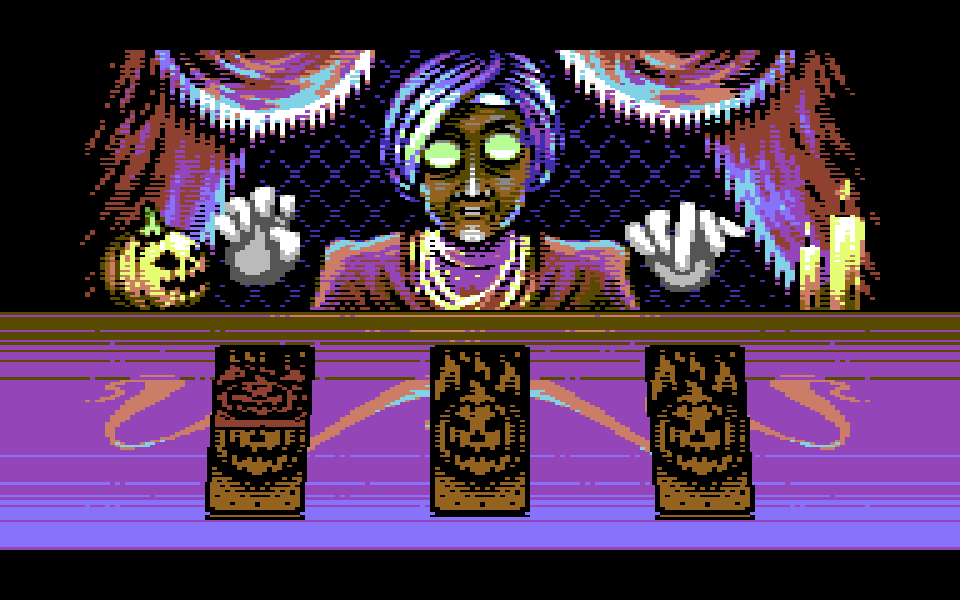
The side cards have a slight perspective tilt. Baked into the data it was made of 2 pixel (multicolour) steps that broke the drawing, so the X position of the sprites is rewritten in hardware, line after line, in steps of 1 hires pixel.
On the table every rasterline has a tight budget. The badlines and the sprites take most of the cycles, and the few cycles left must carry all the register writes the line needs: the X position of a card, the switch to the next band, the Y position of the sprites, the border colour. Each write sits at an exact cycle of the line, and the border colour changes, which extend the table into the side borders, have to land while the beam is outside the visible screen.
All the movement is designed in advance: smooth curves for the hand-made motion of the cards (lift, rotate, set down with a tiny overshoot), the riffle shuffles, the cut into three piles. The part plays it back as a list of events, frame by frame, and every frame of the list is checked in advance against the rasterlines available, so none of them runs out of time.
A few rules came out of it: no alternating line patterns on objects moving vertically (they flicker at 25Hz), no oscillations smaller than 2 lines in a trajectory, and never move anything horizontally below 50Hz.
Side 5, on the third disk, holds an arcade game made for the demo: The Pumpkids. A game inside the demo has become a Pumpkins tradition, as it was with Slash with Ash in All Hallows’ Eve. Mother Pumpkin has lost her little ones and has to bring them home. To get through each level she has to jump and avoid the obstacles, picking up the pumpkids along the way. Touching an enemy costs her one of the little ones, and the way to the next level only opens once all of them have been found.
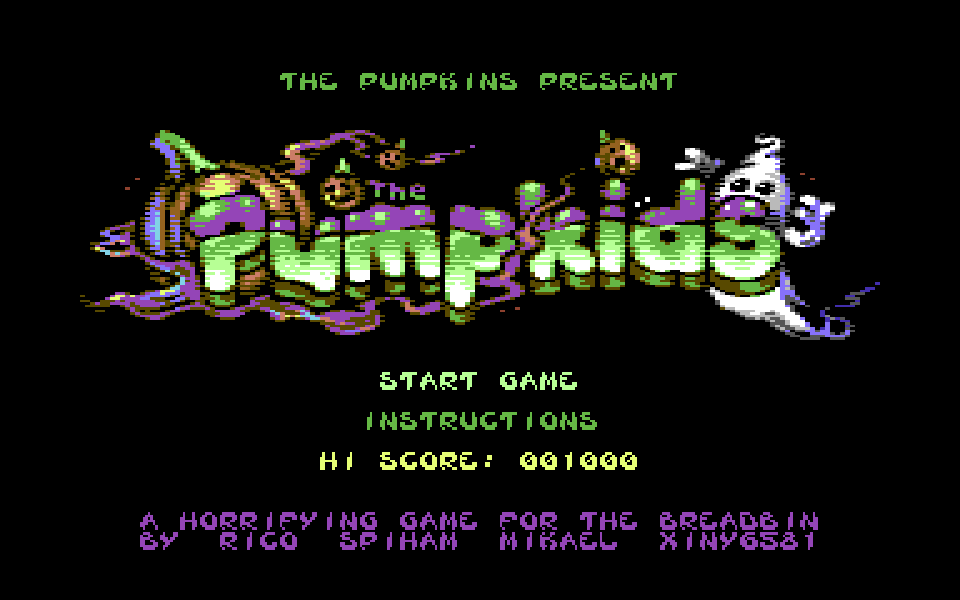
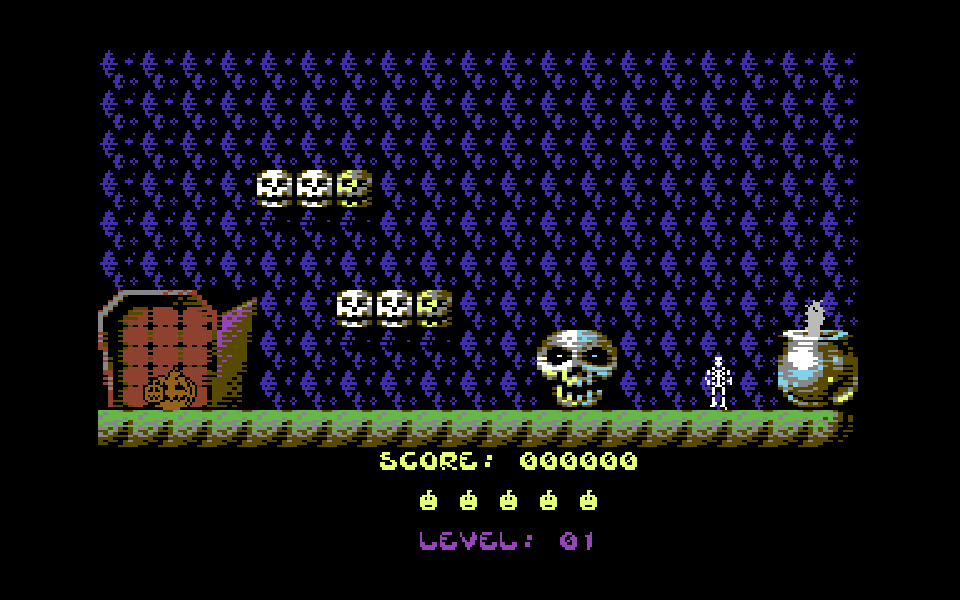
Code by Rico, logo and level backgrounds by Mikael, sprites and text by Spiham, music by Xiny6581.